In Java, a standard array has a **fixed size**—once you create it, you cannot shrink or grow it. However, we often use ArrayList, which seems to grow automatically whenever we add elements. How does it do this?
ArrayList doesn't actually stretch. Instead, it swaps out smaller arrays for larger ones behind the scenes. Let's see how this works using a simple toy box analogy.
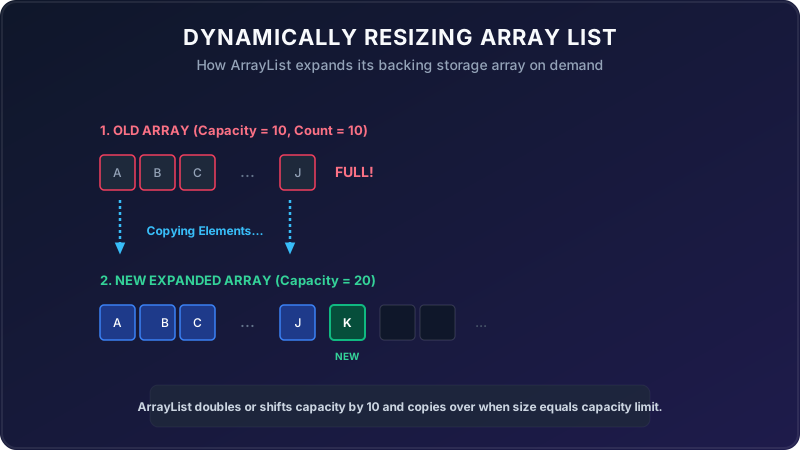
Imagine you have a small toy box (Array) that has room for exactly **10 toys** (Capacity = 10).
You keep cleaning your room and putting toys in the box one by one. Eventually, you submit your 10th toy. The box is now full. When you pick up the 11th toy, it doesn't fit!
To solve this, you follow a simple strategy:
- You buy a **new, larger toy box** that has room for 20 toys (Capacity = 20).
- You move all 10 toys from the old box into the new box.
- You throw the old, full toy box in the recycling bin.
- You place your 11th toy into the new box!
Walkthrough of the Test Scenario
Let's trace how the program executes step-by-step from the entry point of the test case:
The test initializes a CustomList with an initial capacity of exactly 1:
CustomList<Integer> firstList = new CustomList<>(1);This creates a backing object array of size 1. Size count starts at 0.
The program adds the number 2 to the list:
firstList.add(2);Since count < capacity (0 < 1), the number 2 is placed at index 0. The count increments to 1. The list size is now 1, and the array capacity is full.
The program adds the number 3 to the list:
firstList.add(3);- Since
count == capacity(1 == 1), the array is full! - The capacity increments by 10 (new capacity = 11).
restructureArray()is called: it creates a new array of size 11 and copies the number 2 into it.- The number 3 is added at index 1. Count increments to 2.
The program adds another 2 (fits easily since 2 < 11 capacity). Size count becomes 3. The test successfully asserts that size is 3, and value at index 0 is 2:
Assert.assertEquals(3, firstList.getSize());
Assert.assertEquals(2, firstList.getIndexedData(0));
Java Implementation
Below is the complete Java code demonstrating custom ArrayList resizing logic:
package io.practise.accolite;

public class CustomList {
    private int capacity = 10;
    private Object content[] =  new Object[capacity];
    private int count;

    public CustomList(int capacity) {
        this.capacity = capacity;
        this.content = new Object[capacity];
    }

    public CustomList() {
    }

    public int getSize() {
        return count;
    }

    public void add(T eachContent) {
        if (count < capacity) {
            content[count] = eachContent;
        } else if (count == capacity) {
            capacity += 10;
            restructureArray();
            content[count] = eachContent;
        }
        ++count;
    }

    private void restructureArray() {
        Object[] tempArray = content;
        this.content = new Object[capacity];
        copyArray(tempArray, this.content);
    }

    public Object[] getContent() {
        return content;
    }

    public Object getIndexedData(int index) {
        if (index < count) {
            return content[index];
        } else {
            throw new ArrayIndexOutOfBoundsException("You are trying to reach null value.");
        }
    }

    private void copyArray(Object[] tempArray, Object[] content) {
        for (int index = 0; index < tempArray.length; ++index) {
            content[index] = tempArray[index];
        }
    }

    public void delete(int index) {
        if (index < count) {
            content[index] = null;
        }
    }
}
Conclusion
A dynamic array like ArrayList acts like it has endless size, but underneath, it works by allocating a larger array and copying elements over when the limit is reached. Understanding this helps write performant code by initializing lists with a proper starting capacity when size is known beforehand!