By default, Kafka clusters are completely open. Any client can connect to a broker without a password, read from any topic, and write fake data. In production environments, this lacks basic security controls.
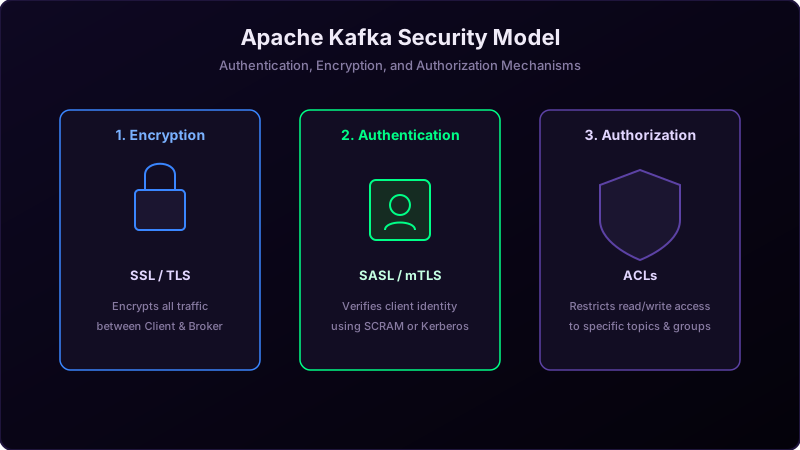
Securing Apache Kafka involves three distinct layers: **Encryption in Transit**, **Authentication**, and **Authorization**. Let's review these concepts and how they secure a cluster.
Imagine visiting a high-security military vault:
- Encryption is the armored car. When you transport documents between the base and the vault, you lock them in an armored car so no one can intercept them on the road.
- Authentication is the gate guard. When you arrive, you must present your military ID or badge (username/password or certificate) to prove you are who you claim to be.
- Authorization is the room clearance levels. Just because you got through the front gate doesn't mean you can enter the top-secret room. The guard checks an access list (ACL) to see if you have clearance for Room B.
The Three Pillars of Kafka Security
1. Encryption in Transit (SSL / TLS)
By default, Kafka traffic is sent as raw text, making it vulnerable to packet sniffing. Setting up SSL/TLS encrypts all communication between clients and brokers, and between brokers themselves, preventing wiretapping.
2. Authentication (SASL / mTLS)
Authentication verifies the identity of the connecting client. Kafka supports two main options:
- mTLS (Mutual TLS): The client and broker present security certificates to verify each other.
- SASL (Simple Authentication and Security Layer): Users log in using username/password. SASL support includes **SASL/SCRAM** (hashed password databases stored inside ZooKeeper/KRaft) and **SASL/PLAIN** (cleartext, only recommended if wrapped inside an encrypted SSL tunnel).
3. Authorization (ACLs)
Once a client is authenticated, you must define what actions they can perform. Kafka uses **Access Control Lists (ACLs)** to set permissions. For example, you can create a rule stating: "User Alice is allowed to WRITE to topic 'orders', but is NOT allowed to READ from it."
Java Client SSL/SASL Configuration Example
To connect a producer securely using SASL and SSL, configure the client properties as follows:
Properties props = new Properties();
props.put("bootstrap.servers", "secure-broker:9093");

// Define security protocols
props.put("security.protocol", "SASL_SSL");
props.put("sasl.mechanism", "SCRAM-SHA-256");

// Configure SCRAM User credentials
String jaasConfig = "org.apache.kafka.common.security.scram.ScramLoginModule required " +
    "username=\"alice\" password=\"alice-secret\";";
props.put("sasl.jaas.config", jaasConfig);

// Configure truststore location for SSL verification
props.put("ssl.truststore.location", "/var/private/ssl/kafka.client.truststore.jks");
props.put("ssl.truststore.password", "truststore-secret-password");

KafkaProducer<String, String> producer = new KafkaProducer<>(props);
Conclusion
Securing Kafka is essential for maintaining enterprise safety. Always encrypt your traffic using **SSL/TLS**, verify client identities via **SASL/SCRAM**, and enforce least-privilege access permissions using **ACLs**.