In the Kafka Streams library, data streams are modeled using two primary abstractions: KStream and KTable. These abstractions represent the two sides of a famous architectural coin: the duality between streams and tables.
Understanding when to use a KStream versus a KTable is the key to designing stateful calculations, joins, and aggregates in your stream-processing applications. Let's compare their core mechanics and differences.
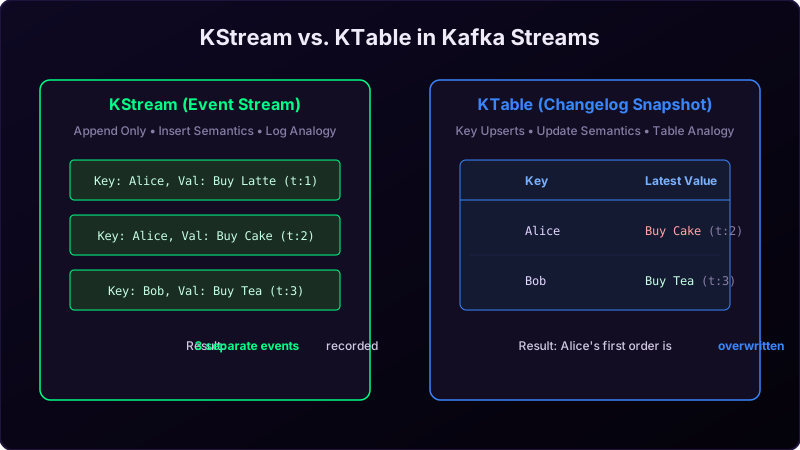
Imagine managing your bank account:
- KStream is like your bank statement (Transaction Log). It records every transaction as a separate line item: "Received +$100 (t:1)", "Spent -$10 (t:2)". Each line is appended to the list and never modified.
- KTable is like your current account balance page. It doesn't show the history of how you got there; it only shows your latest status: "Balance: $90". When a new transaction arrives, the balance number is overwritten (upserted).
Detailed Comparison Table
| Aspect | KStream | KTable |
|---|---|---|
| Semantics | Infinite, unbounded event stream. | Changelog snapshot representing latest values. |
| Message Write | Append (INSERT semantics). | Upsert by Key (UPDATE semantics). |
| Null Values | Treated as a regular event with empty payload. | Treated as a DELETE (Tombstone record). |
| Use Case | Individual events (clicks, sensor inputs). | Active state records (user profile configurations). |
Declaring KStream and KTable in Java
Using the StreamsBuilder, you can consume topics as streams or tables easily:
StreamsBuilder builder = new StreamsBuilder();

// 1. Consume a topic as an event stream
KStream<String, String> clickStream = builder.stream("user-clicks");

// 2. Consume a topic as a changelog table (retains only latest value per key)
KTable<String, String> userProfiles = builder.table("user-profiles");
The Stream-Table Duality
A stream can be converted into a table, and a table can be converted into a stream:
- Stream to Table: Grouping a KStream and running an aggregation (like
count()) creates a KTable representing the running counts. - Table to Stream: Calling
ktable.toStream()converts updates on the table back into a sequence of change events (changelog stream).
Conclusion
Model your raw, chronological events using a **KStream**. When you need a lookup table containing the latest state of an entity (like checking a user's current subscription tier during a join operation), consume that topic as a **KTable** to let Kafka handle upsert deduplication automatically.