In a Kafka consumer group, partitions are divided fairly among all active consumer instances. But what happens if a consumer crashes, a new instance is deployed, or a network glitch cuts off a node? Kafka responds by performing a process called **Consumer Rebalancing**.
While rebalancing is crucial for maintaining fault tolerance, it comes with a major cost: **during a rebalance, consumers stop reading data**, leading to stop-the-world pauses and processing delays. Let's look at what triggers rebalances and how to minimize their impact.
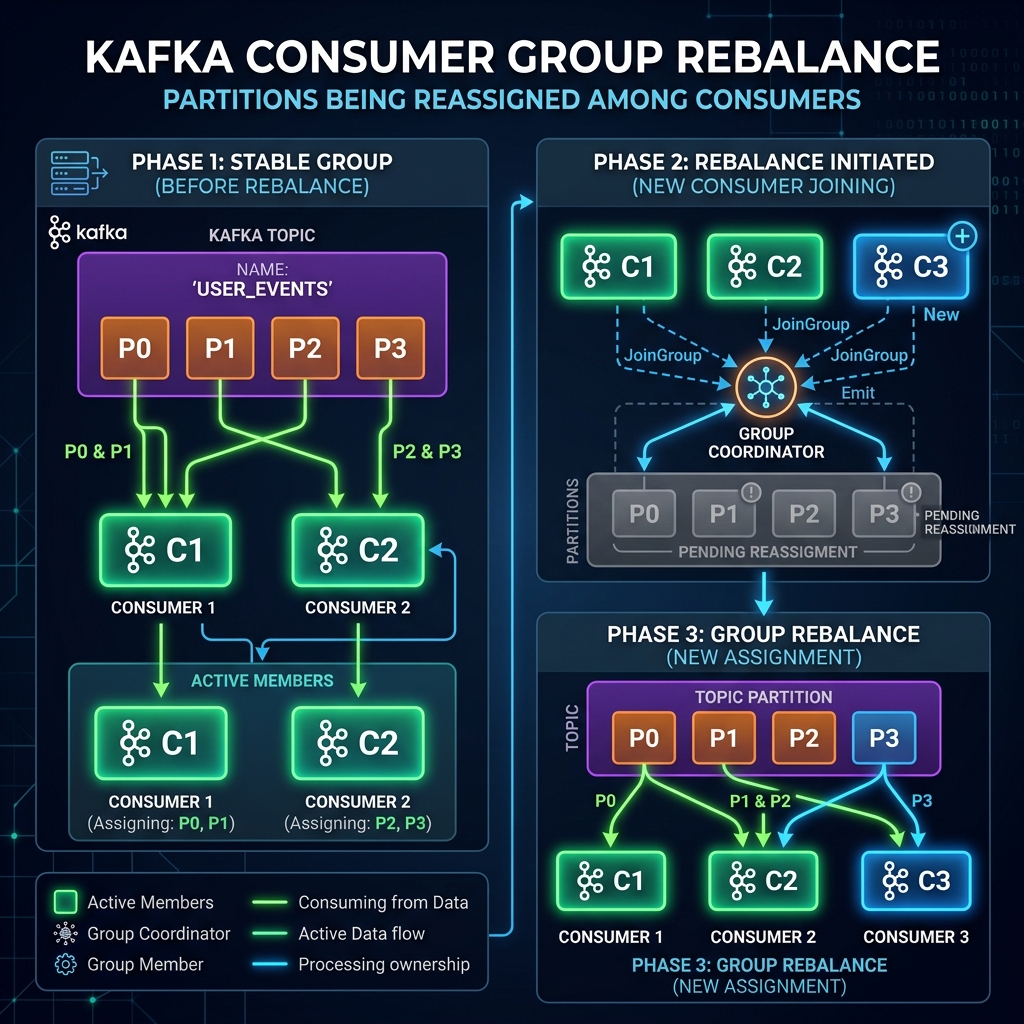
Imagine a team of 3 office workers dividing a pile of documents to review. Suddenly, a 4th worker joins the room.
Everyone must stop working immediately, gather up all their current folders, and stand in a circle. The team manager recalculates who should take which files, distributes them anew, and then tells everyone they can sit back down and resume working.
This "stop work and shuffle" is **consumer rebalancing**. If a worker briefly steps out to grab a glass of water, they shouldn't trigger this entire desk rearrangement if they are coming right back!
What Triggers a Rebalance?
A rebalance is initiated whenever the partition-to-consumer assignment needs to change:
- Group Membership Changes: A new consumer joins the group, or an existing consumer leaves (via explicit shutdown or crashing).
- Heartbeat Failures: A consumer fails to send a heartbeat ping to the broker group coordinator within the
session.timeout.mslimit (usually due to a crash or network disconnect). - Slow Processing loops: A consumer takes longer than
max.poll.interval.msto process a batch of records, causing it to skip the next `.poll()` call. The broker assumes the consumer is dead and kicks it out of the group. - Topic Modifications: Partitions are added to a subscribed topic.
Tuning Variables to Minimize Rebalances
You can configure your consumer clients to avoid false rebalances caused by brief network hiccups or slow database updates:
1. heartbeat.interval.ms & session.timeout.ms
The consumer sends background pings (heartbeats) to let the broker know it's alive. If the broker doesn't receive a heartbeat for session.timeout.ms (default 45000ms), it triggers a rebalance. Set heartbeats to 1/3 of the session timeout:
props.put("session.timeout.ms", "45000");
props.put("heartbeat.interval.ms", "15000");
2. max.poll.interval.ms
If your application has to perform heavy calculations or slow database writes, increase this setting (default 300000ms, or 5 minutes) to give your poll thread enough time to complete the work without triggering a rebalance:
props.put("max.poll.interval.ms", "600000"); // 10 minutes3. Static Membership (group.instance.id)
By default, when a consumer restarts, it gets a new ID, triggering a rebalance. In Kafka 2.3+, you can assign a static group.instance.id. If a consumer restarts within the session timeout window, it rejoins without triggering a rebalance:
props.put("group.instance.id", "processor-node-1");Conclusion
Consumer rebalances ensure that your data continues to flow even when nodes crash. However, false rebalances cause unnecessary pauses. Tune your poll timeouts and use **static membership** to build a highly stable and resilient consumption layer.