In high-volume applications, a single consumer process can easily get overwhelmed by the sheer volume of incoming events. To prevent consumer lag from building up, you need a way to distribute the work across multiple instances of your application.
In Apache Kafka, this scalability is handled natively by Consumer Groups. Let's look at how Kafka manages and load-balances messages across consumer groups.
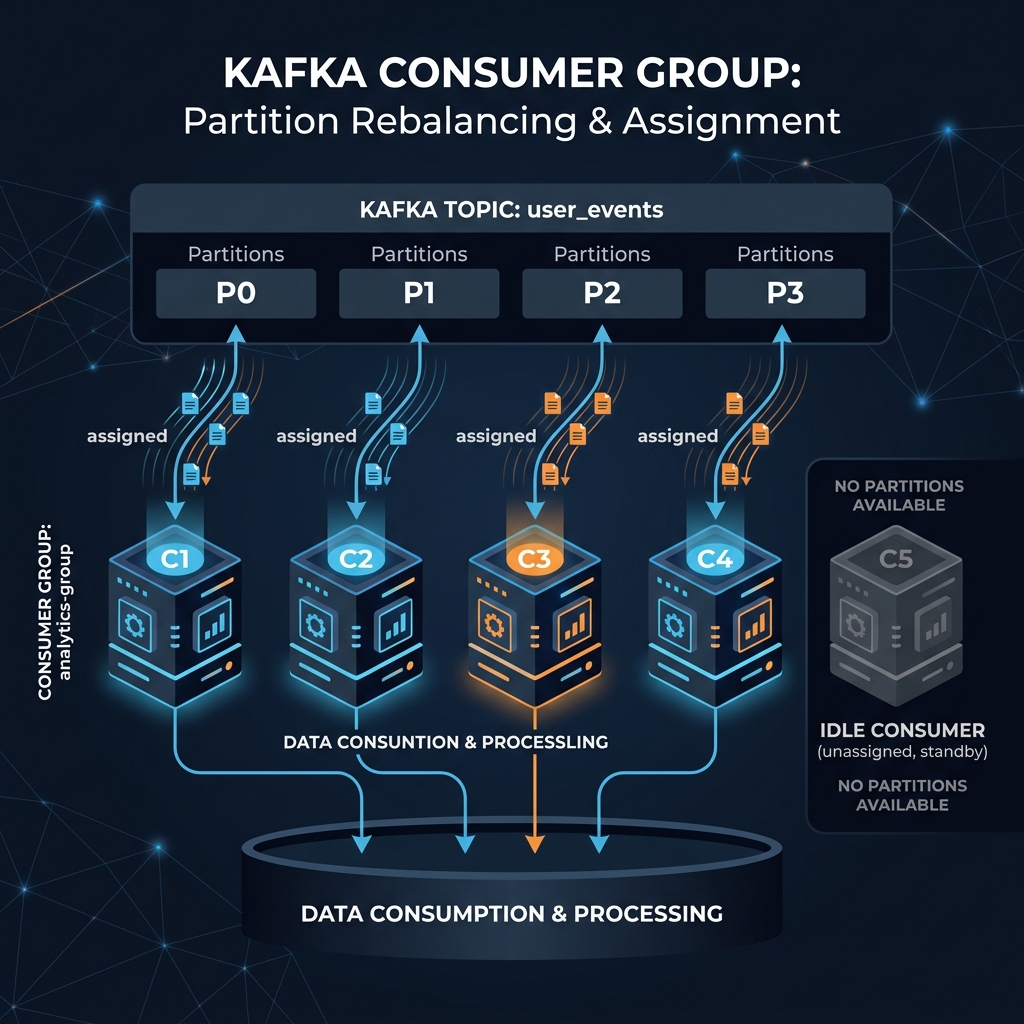
Imagine a hotel with 4 dirty rooms (partitions 0, 1, 2, and 3):
- If you have **1 housekeeper** (a single consumer instance), they must clean all 4 rooms one after another. It takes a long time.
- If you hire a team of **2 housekeepers** (a consumer group), they split the load. Housekeeper A cleans rooms 0 & 1, while Housekeeper B cleans rooms 2 & 3. They clean the hotel twice as fast!
- If you bring in **4 housekeepers**, each takes exactly 1 room.
- If you bring in **5 housekeepers**, 4 will take a room, and 1 will sit in the lobby drinking coffee (idle) because you can't split a single room (partition) between two workers without them stepping on each other's toes.
How Partition Assignment Works
When you start a consumer client, you assign it a group.id. All consumer instances with the same group.id form a single group. Kafka coordinates them using these core rules:
- Each partition inside a topic is assigned to **exactly one consumer** in the group.
- If the number of consumers in a group is **greater** than the number of partitions, the extra consumers will sit idle.
- If the number of consumers is **less** than the number of partitions, some consumers will read from multiple partitions.
Basic Java Consumer Example
Here is how to create a basic Kafka consumer that joins a group named order-processors and polls for data:
import org.apache.kafka.clients.consumer.*;
import java.time.Duration;
import java.util.*;

Properties props = new Properties();
props.put("bootstrap.servers", "localhost:9092");

// Join the consumer group
props.put("group.id", "order-processors");

props.put("key.deserializer", "org.apache.kafka.common.serialization.StringDeserializer");
props.put("value.deserializer", "org.apache.kafka.common.serialization.StringDeserializer");
props.put("auto.offset.reset", "earliest");

KafkaConsumer consumer = new KafkaConsumer<>(props);

// Subscribe to the topic
consumer.subscribe(Arrays.asList("orders"));

// Poll loop
try {
    while (true) {
        ConsumerRecords records = consumer.poll(Duration.ofMillis(100));
        for (ConsumerRecord record : records) {
            System.out.printf("Partition: %d, Offset: %d, Key: %s, Value: %s%n",
                record.partition(), record.offset(), record.key(), record.value());
        }
    }
} finally {
    consumer.close();
}
Broadcast (Fan-Out) Patterns
If you want two different microservices (e.g., an Inventory Service and an Analytics Service) to read the exact same messages from a topic, you simply assign them **different consumer group IDs** (e.g., group.id = inventory-service and group.id = analytics-service). Kafka will send copy streams to both groups independently.
Conclusion
Consumer Groups are what make Kafka highly scalable. By linking partition count to consumer counts, you can increase your processing capacity on the fly by simply adding new consumer instances. Just make sure to size your topic partitions with enough buffer to support your future consumer scale.