Apache Kafka is a highly scalable, robust platform, but its distributed nature means minor configuration mistakes can lead to major production problems. Developers new to Kafka often face issues like processing delays, duplicate messages, or unbalanced servers.
In this guide, we'll look at the three most common Kafka pitfalls, why they happen, and how you can configure your clients to avoid them simply.
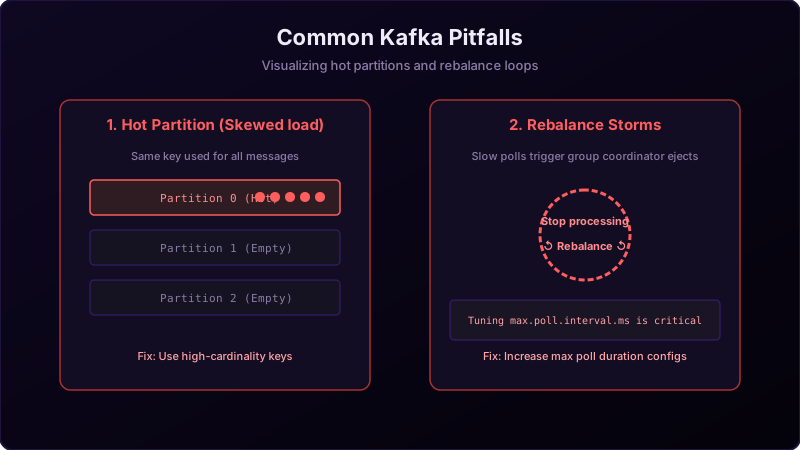
Imagine building a plumbing system for a large apartment block:
If you route all the waste pipes from 100 apartments into a **single primary pipe (hot partition)** while leaving the other 3 drainage pipes completely empty, that single pipe will clog, backup, and burst.
Furthermore, if your repair crew takes too long to fix a leak, and the management company keeps firing and replacing them every 5 minutes (false rebalances), no actual work gets done and the building floods.
Pitfall 1: Hot Partitions (Skewed Load)
A **Hot Partition** occurs when one partition in a topic receives significantly more messages than the others, overloading the broker hosting it while other brokers sit idle.
- Why it happens: Poor choice of message keys. For example, if you partition a retail topic by `countryCode`, and 95% of your orders are from the `US`, Partition 0 (holding the US hash) will be overloaded.
- How to avoid it: Use high-cardinality keys that contain diverse values (like
userIdortransactionId) to distribute records evenly across all partitions.
Pitfall 2: Uncontrolled Rebalance Storms
A **Rebalance Storm** occurs when consumer group rebalances happen repeatedly, stalling message consumption indefinitely.
- Why it happens: If your consumer takes longer to process a batch of records than
max.poll.interval.ms, the broker assumes the consumer is dead, kicks it out of the group, and triggers a rebalance. When the consumer finally finishes and polls again, it rejoins, triggering another rebalance. - How to avoid it:
- Reduce
max.poll.recordsso your application processes smaller batches. - Increase
max.poll.interval.msto give your consumer threads more time. - Enable **Static Membership** using
group.instance.id.
- Reduce
Pitfall 3: Committing Offsets Before Processing
Committing offsets immediately after calling .poll() leads to silent data loss.
- Why it happens: If your consumer pulls a batch, commits the offset (moving the bookmark forward), and then crashes or gets a database error during the processing loop, those records are never processed. When the consumer restarts, it skips those messages.
- How to avoid it: Always use the **Process-then-Commit** pattern. Only commit offsets after your business logic executes successfully.
Conclusion
Avoid generic configurations in production. By picking high-cardinality partitioning keys, matching poll record limits to processing speeds, and committing offsets only after data processing finishes, you build a stable and fast Kafka architecture.