In enterprise Java programming, data needs to be stored persistently. **JDBC (Java Database Connectivity)** is the standard industry Java API that enables applications to connect to relational databases (like MySQL, Oracle, or PostgreSQL), execute queries, and fetch results.
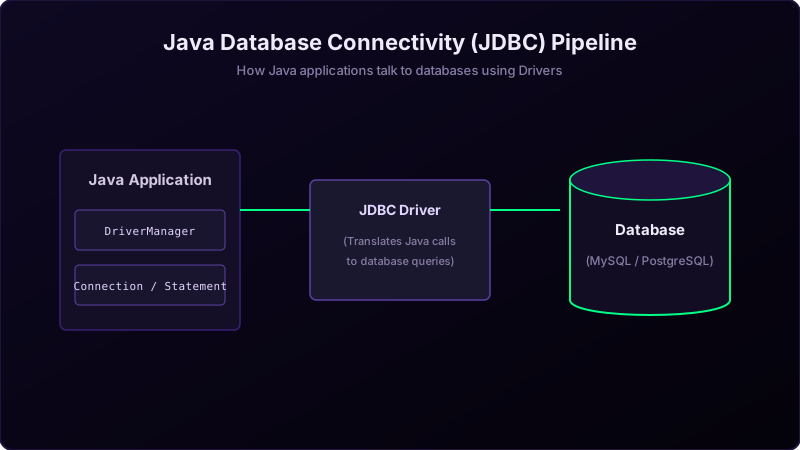
Real-World Analogy: Dialing the Database Vault Office
Imagine you run a shipping business and want to look up order records stored inside a highly secure **vault (the database)** across town:
You cannot walk in yourself. Instead, you do this:
- Dial the connection line (DriverManager): You call the vault's phone office using a translator operator who speaks their specialized dialect (the Driver).
- Connect (Connection): Once the clerk picks up, you establish a secure, live calling channel.
- Read the script (Statement): You read your request script written in SQL.
- Write down answers (ResultSet): The clerk reads back the rows of records, and you write them down on a clipboard notepad.
Step-by-Step Connection Steps
- Load the Driver Class: Load the database-specific driver library dynamically (e.g.
Class.forName("com.mysql.cj.jdbc.Driver")). - Establish Connection: Call
DriverManager.getConnection(url, user, password)to start the channel. - Create Statement: Instantiate a
Statementobject to host your SQL queries. - Execute Query: Execute the query using
executeQuery()or updates usingexecuteUpdate(). - Process ResultSet: Loop through the rows of the returned
ResultSetclipboard. - Close Resources: Always close resources in a
finallyblock to avoid leaking network sockets or database connections.
Java Implementation
package io.practise.myPractice;

import java.sql.Connection;
import java.sql.DriverManager;
import java.sql.ResultSet;
import java.sql.Statement;

public class DataBaseConnectivity {
    public static void main(String[] args) {
        Connection conn = null;
        Statement stmt = null;
        ResultSet rs = null;
        try {
            // Load Driver
            Class.forName("com.mysql.cj.jdbc.Driver");

            // Get Connection
            conn = DriverManager.getConnection("jdbc:mysql://localhost:3306/shop", "root", "password");

            // Create Statement
            stmt = conn.createStatement();

            // Execute SQL query
            rs = stmt.executeQuery("SELECT id, name FROM users");

            // Loop through results
            while (rs.next()) {
                int id = rs.getInt("id");
                String name = rs.getString("name");
                System.out.println("ID: " + id + ", Name: " + name);
            }
        } catch (Exception e) {
            e.printStackTrace();
        } finally {
            // Safely close resources
            try { if (rs != null) rs.close(); } catch (Exception e) {}
            try { if (stmt != null) stmt.close(); } catch (Exception e) {}
            try { if (conn != null) conn.close(); } catch (Exception e) {}
        }
    }
}
Conclusion
Using standard JDBC interfaces ensures database-independent code structure. This makes it simple to swap database systems in the future by switching the target JDBC driver jar and connection URLs.