In Java, any collection that can be traversed using the enhanced for-each loop (for (Type item : collection)) must implement the Iterable interface. Under the hood, this interface returns an Iterator, which handles checking for next items and moving the index cursor forward.
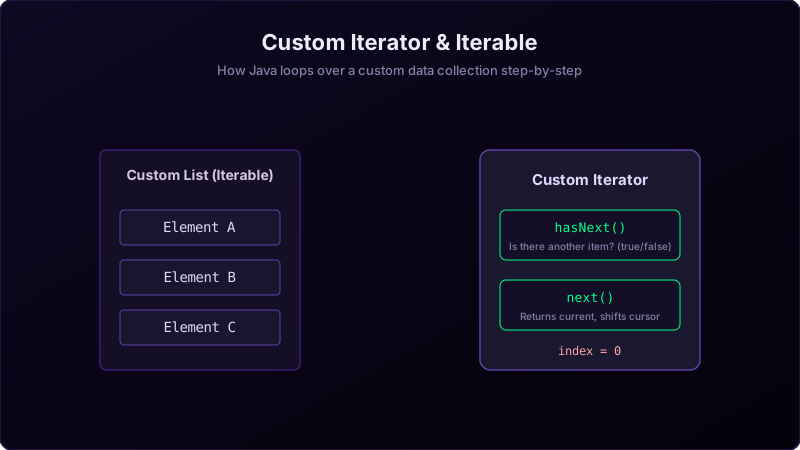
Imagine you have a **deck of cards (the Iterable container)**. The deck itself just holds the cards; it doesn't know how to deal them one-by-one safely.
So, you place the deck inside a **mechanical dealer machine (the Iterator)**. When you ask the machine:
hasNext(): The machine checks if there is at least one card remaining inside the slot.next(): The machine slides the top card out to you and moves the internal spring cursor up by one slot so it's ready for the next request.
Implementing Custom Iterator in Java
To make a custom class iterable, you must:
- Implement
Iterable<T>on your container class, which requires implementing the methodpublic Iterator<T> iterator(). - Write a helper class implementing
Iterator<T>that tracks a cursor position and implementshasNext()andnext().
package io.practise.myPractice;

import java.util.Iterator;

public class IterableInterfaceImplementation implements Iterable<String> {

    private String[] elements = {"Apple", "Banana", "Cherry"};

    @Override
    public Iterator<String> iterator() {
        return new CustomIterator();
    }

    private class CustomIterator implements Iterator<String> {
        private int cursor = 0;

        @Override
        public boolean hasNext() {
            return cursor < elements.length;
        }

        @Override
        public String next() {
            if (!hasNext()) {
                throw new java.util.NoSuchElementException();
            }
            return elements[cursor++];
        }
    }

    public static void main(String[] args) {
        IterableInterfaceImplementation collection = new IterableInterfaceImplementation();
        for (String item : collection) {
            System.out.println(item);
        }
    }
}
Conclusion
By custom-implementing `Iterator` and `Iterable`, you can expose custom internal structures (like binary trees, graphs, or encrypted lists) to simple standard loops, keeping your code clean and unified.